

Measuring Cobb Angles with a Digital Workspace




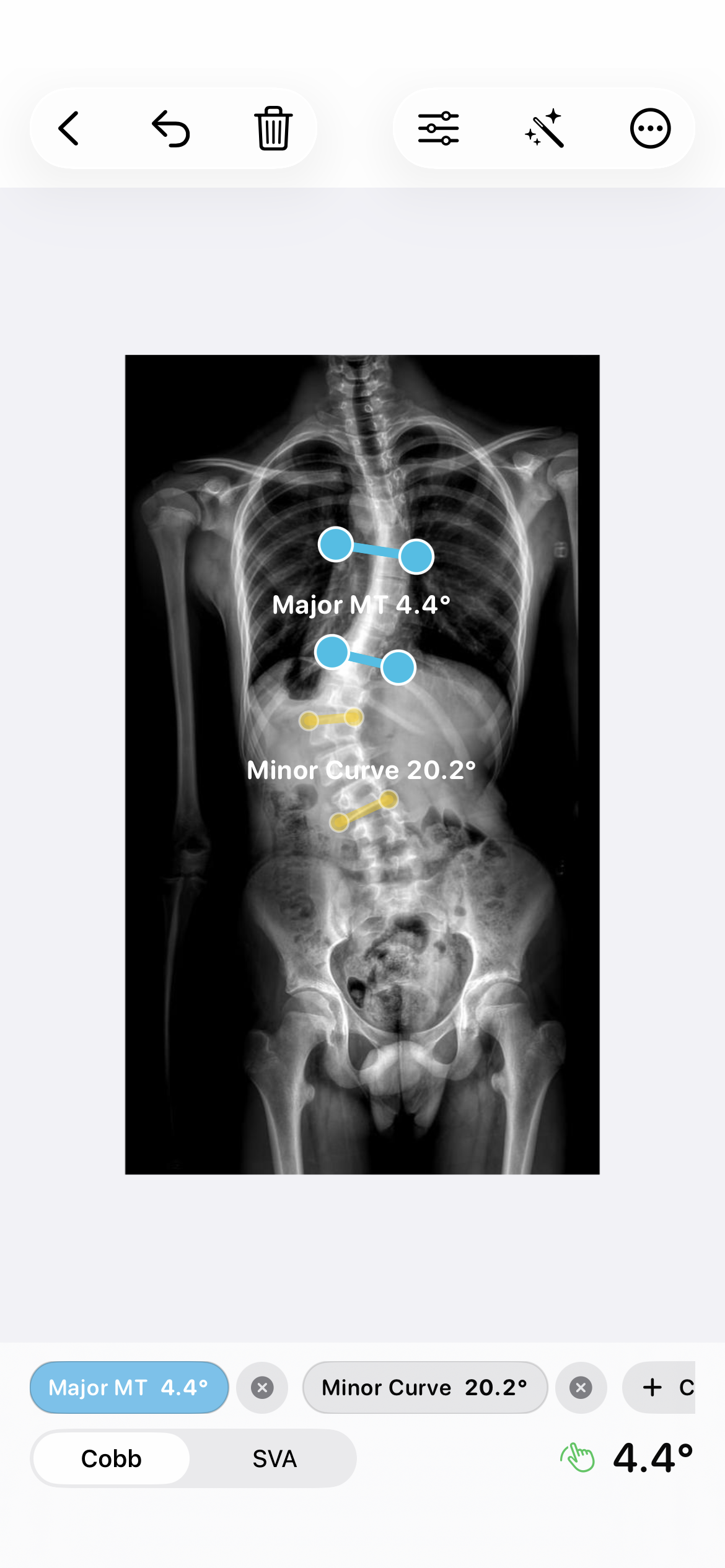
Cobb Angle Pro puts the X-ray, measurement lines, and saved case history in one iPhone workspace. It is a measurement and documentation aid: the person reviewing the image chooses and checks the landmarks and remains responsible for interpreting the result.
Start with a local case
Import an X-ray from Photos and create a case in the app. Before measuring, confirm that the image is the intended view and that any patient information you choose to record follows your own workplace rules. The app stores its case data on the device unless you deliberately share or back it up.
Place and check the Cobb lines
- Open the image in the measurement workspace and choose the Cobb tool.
- Place the upper and lower end-vertebra landmarks on the image. The app draws the measurement lines and updates the angle as you move the points.
- Zoom and adjust image presentation when needed, then inspect every landmark against the image before saving.
- Save the reviewed result with the case so you can return to the image and measurement later.
When a measurement is suggested automatically, treat it as a starting point. The suggested position can be adjusted manually before the result is saved; the app does not determine a diagnosis or treatment plan.
Document what was reviewed
The export workflow can produce an annotated JPEG or PDF for a record or discussion. Review the image, labels, and case details before sharing. A saved angle is one observation from an image, not a clinical conclusion by itself.
For related joint measurements, see the range of motion measurement guides.